An instrument you
play by drawing.
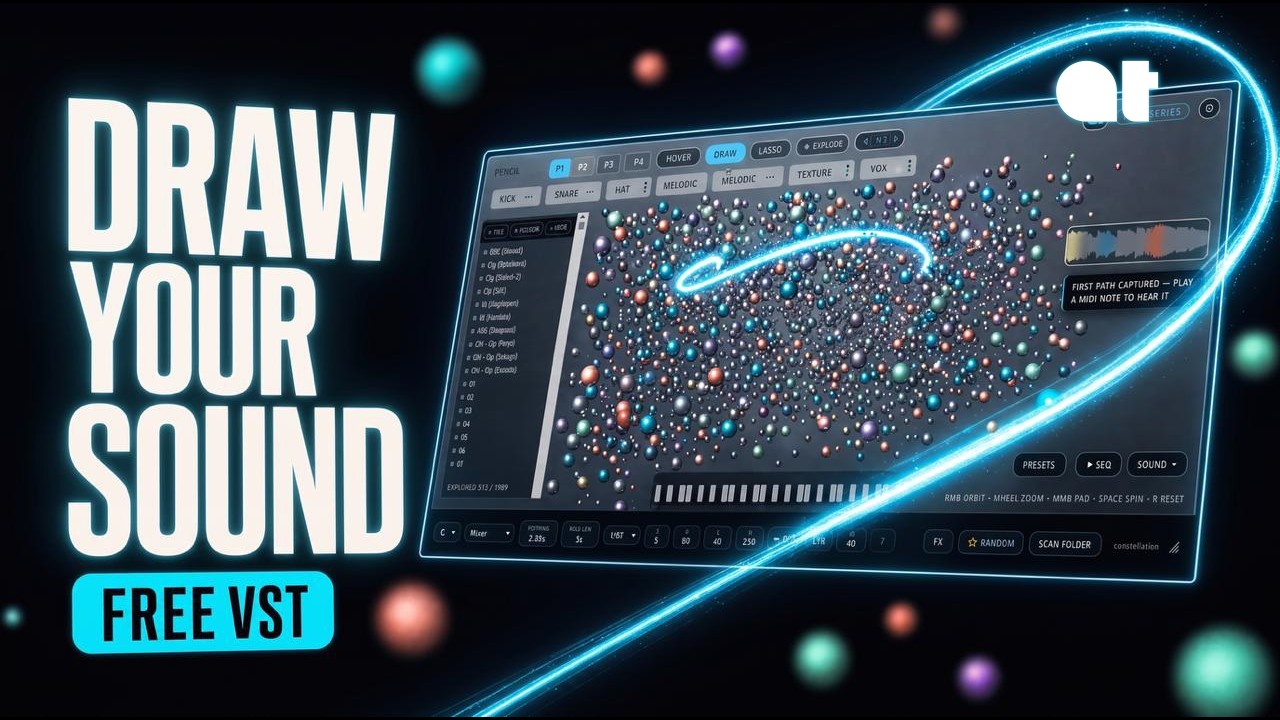
Drop a folder of samples and Pathfinder scatters them into a living field of light. Draw a path to play it, pull a sphere apart into tempo-synced grains, and shape the whole thing with effects.
Want the whole instrument? Pathfinder Pro brings its own 487 sounds, six FX slots and drag-to-DAW. Start for $12.99 a month · see what it adds
Pathfinder was made for your phone.
The plugin is the engine. Pathfinder Sketch is the instrument. Your iPhone or iPad becomes the controller: draw the field from across the room, pass the phone around so up to four people jam on the same session, or play the full demo on the phone alone, no computer needed.
Draw from anywhere
Your phone mirrors the plugin's field over your own Wi-Fi. Trace paths from across the room.
Pass-the-phone jams
Up to four players on one session, each drawing in their own color.
Playable demo
A full session runs on the phone alone. No computer needed to try it.


Free on iPhone & iPad. Pair it with the desktop plugin, or play the demo on the phone alone.
Four moves. That's the whole instrument.
No menus to learn. You drop, draw, explode and shape, and the field responds in real time.

Drop in a folder
Drag any folder of samples straight onto the plugin. It analyzes each one and scatters them into a 3D field. Brighter, closer spheres are the sounds it likes best for playing.

Draw a path to play
Trace a line through the field and Pathfinder plays every sphere it crosses, in order. The shape of your line becomes the rhythm and melody of the phrase.

Explode a sphere
Grab a single sound and blow it apart into tempo-synced grains. One sample becomes a swarm you can re-scatter, re-pitch, and play back as a texture.

Shape it with FX
Drag effects into any order: reverb, degrade, flair, delay and a granular engine. Reorder the chain live to sculpt the field into a finished sound.
A granular sampler that feels like an instrument.
Your samples, mapped
Nothing is baked in. Feed it your own drum kits, field recordings, or one-shots and it builds a fresh field from whatever you give it.
Drawn, not programmed
Paths are performances. Draw fast or slow, jagged or smooth. The gesture is the sequence, so no two takes are the same.
Tempo-synced grains
The granular engine locks to your DAW. Explode a sound and every grain lands on the grid, from tight stutters to slow, drifting clouds.
Everything inside.
A whole sampler lives under the map: scan, draw, sequence, edit and process, all in one instrument.
Particle map
Every sample becomes a sphere, auto-sorted into kick, snare, hat, perc, melodic, texture, vox and FX.
Category detection means you find the right sound by where it sits, not by scrubbing filenames.Draw the path
Play any route from MIDI, tempo-locked and pitch-corrected to your project key and scale.
Key detection lets samples from totally different sources play in tune together. No manual retuning.Layer mode
One key fires your whole captured group as an instant stack.
Explode
Select a sample and slice it into tempo-synced chunks scattered back onto the map.
A fast way to turn one hit into a whole palette of rhythmic fragments.Step sequencer
Per-lane sounds, with swing and nudge.
Deep sound editor
Trim, envelope, pitch and volume per sound, plus a chromatic pitch-tracked keyboard for any sphere.
Five-effect chain
Reverb, Degrade, Flair, Delay and a tempo-synced Granular engine. Drag to reorder, with full parameter pages.
Presets that remember everything
Paths, sequencer, effects, categories and settings, all saved together.
MIDI CC learn · scalable interface · built-in walkthrough
Same instrument. Every sound it can make.
Less than one sample pack a month. Free Pathfinder scatters your own samples and lets you draw them. Draw a path through them and those samples become a sequence, Arp or layered instrument. Pro brings its own sound: 487 additional instruments included. Three engines, four layers, 6 rearrangeable effect slots and a step-sequencer to customize loops even further, a randomize button that starts the idea for you, and drag-and-drop straight onto a track.
Drag straight to your DAW
Drag an orb out of the field and drop it on a track. The sample lands in your DAW. No bounce, no export dialog.
Randomise anything
One click rolls a new field, a new path, a new instrument or a new effect chain. Everything it makes stays editable.
New DSP
Six slots you fill and reorder: reverb, waveshaper, flair, delay, granular and drive. The rack saves with the preset.
Cancel any time. Twelve payments and the licence is permanent. Everything you made in free keeps working.
Things to try.
No two folders make the same map. No two paths make the same instrument. A few places to start:
In-key arps
Draw a path across only your melodic spheres for evolving arpeggios that stay in your song's scale.
Granular textures
Explode a vocal or pad, then draw a new path through the fragments for moving, atmospheric fills.
Kits from chaos
Lasso your kick, snare and hat spheres and build a drum pattern in the step sequencer from found sounds.
Instant chords
Capture a melodic group in Layer mode to turn any folder into a one-key chord instrument.
Six fields, made from scratch.
Short takes. Each one is a folder dropped in and a path drawn through it. Headphones help.
Install to first pattern in 7 minutes.
The official tutorial: scan, draw, explode, sequence, and shape, start to finish.
"Seriously, how is this free?" A walkthrough from ADHD Plugins.

It finished 11th of 58. Thank you.
Pathfinder ran in the KVR Developer Challenge 2026, a field of 58 free instruments ranked by the community, and landed a top-20 finish. Huge thanks to everyone who played it and voted. Voting's closed now; the instrument stays free, forever.
Good to know.
Is it really free?+
Yes. Pathfinder is free and open source (GPLv3). No trial, no watermark, no payment. Just a quick free checkout (your email) and your Mac & Windows downloads arrive instantly on the confirmation page and by email. Keep it, use it in commercial work.
What formats and systems?+
VST3 and Audio Unit, universal for Apple Silicon and Intel Macs, plus 64-bit Windows. The macOS installer is signed and notarized; the Windows installer is code-signed.
Do I need to supply samples?+
Pathfinder is built around your own material. Drop any folder of audio onto it and it builds the field from that. It ships ready to scan whatever you drop in.
It doesn't show up in my DAW.+
Pathfinder loads as an instrument, so add it on an instrument / software-instrument track, not an FX slot. On the latest installer it scans cleanly in Logic, Ableton, Reaper, FL Studio and more.
How can I support it?+
The KVR Developer Challenge is over. Pathfinder finished 11th of 58, thank you. The best support now: tell a friend, and if you make something with it, share it and tag Audio Tech Hub. A rating on the KVR product page helps other producers find it.
Pathfinder is free. This is what keeps it that way.
Everything below is built by the same one-person shop. If Pathfinder earns a slot in your rack, these are the paid tools it grew up next to.
MIDI Morph 2
Split any song into stems, then turn any part into clean, playable MIDI. Morph it, scale-lock it, route it to any synth, Pathfinder included.
$79 once, with free updates.
Audio → MIDI ↗Pathfinder Sketch
The iOS companion. Draw the field from your phone, pass it around the room, four players on one session.
Free on the App Store.
Download on iOS ↗Drop a folder.
Draw a path.
Or take the whole instrument: Pathfinder Pro, $12.99 a month. Everything you make in free keeps working.